Drivers know the frustration of dropped calls or dead zones while commuting or road-tripping. In fact, a Pew Research Center survey found 72% of cell phone users experience dropped calls at least occasionally. On the open road, this problem worsens: distance from towers, “dead zones,” and hilly or forested terrain can all interrupt reception. A mobile phone booster for car solves this by amplifying weak outside signals into your vehicle. With one installed, you’ll get stronger cellular coverage, fewer dropped calls, and faster data – even in remote areas. In this guide we’ll explain how car boosters work, their benefits, and how to choose and install the right one, so you stay connected wherever you drive.
Why Invest in a Mobile Phone Booster for Your Car?
- Consistent calls everywhere. Whether commuting or on a family road trip, you should have reliable service. Yet common obstacles – like distance from cell towers, rugged terrain, or “white spots” between towers – cause frequent outages. A car booster keeps your connection steady so you can talk, text, and use GPS without interruption.
- Emergency peace of mind. If you live or travel in rural areas, even emergencies require cell service. A booster ensures you’ll have a signal if you need to call for help or navigation assistance.
- Better data & navigation. Improved signal means faster mobile internet. Streaming music, maps, video calls or hot-spotting will work far better with a booster, even in spotty areas. For example, the weBoost Drive Reach overland booster “collects cell signals from nearby towers… and the inside antenna broadcasts the signal… for clear calls, fast data, [and] reliable navigation”.
- Multi-user coverage. Most vehicle boosters support multiple devices at once. All passengers – on phones or tablets – benefit from the stronger signal, so everyone’s calls and streaming are uninterrupted.
According to Pew, 72% of cell users report dropped calls at least occasionally. On the road, this number can jump, especially if you pass through “dead zones” (areas with no nearby towers). Common causes include simply being far from towers, driving through mountainous or wooded areas, or signal-blocking structures. For these uncontrollable factors, the solution is a car signal booster. In short, if you’ve ever lost service in your car, a booster will almost certainly help fix it.
How Do Mobile Phone Boosters Work?
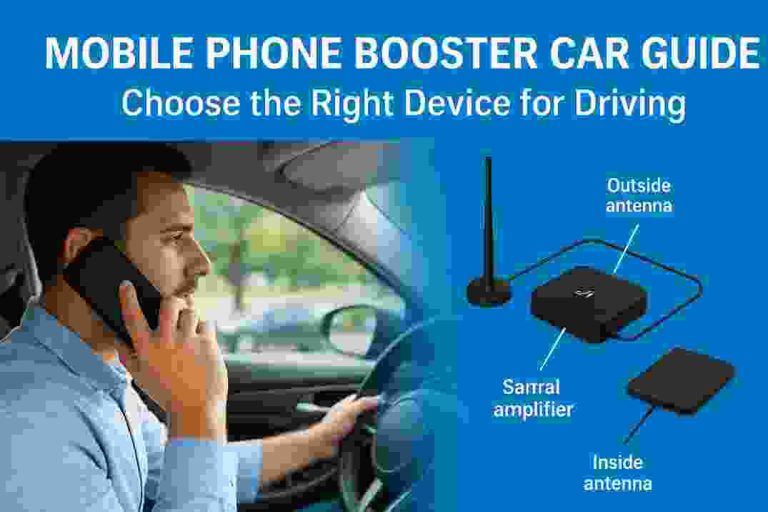
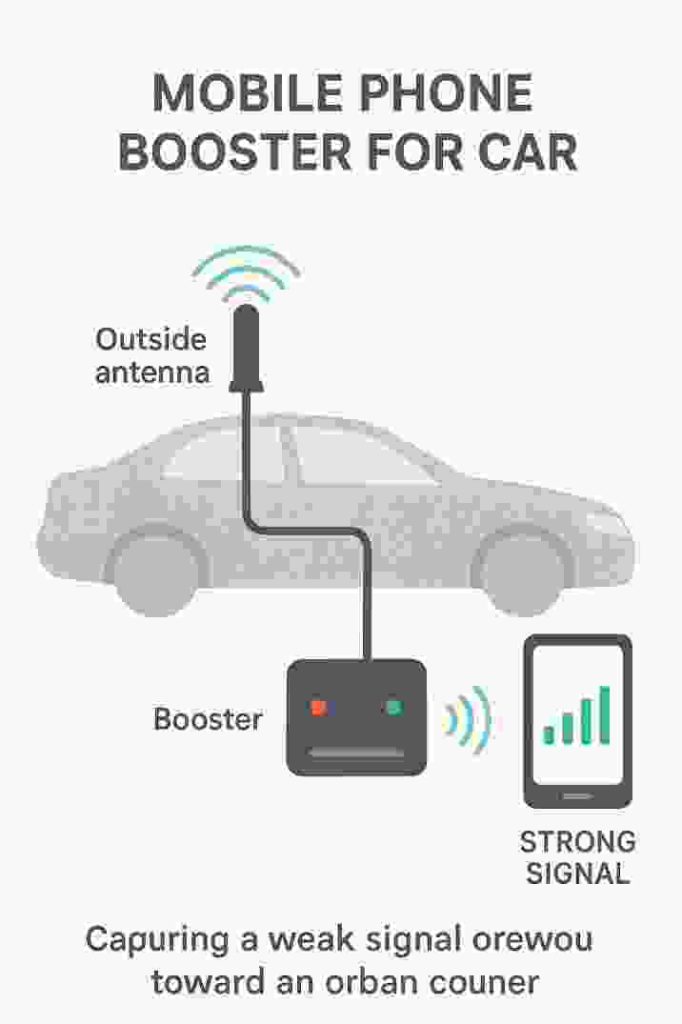
A car cell phone booster system is surprisingly simple yet effective. It has three main parts: an outside antenna, an amplifier unit (booster), and an inside antenna. The outside antenna (usually mounted on your roof) receives weak cell signals from nearby towers. The amplifier then boosts those signals, and the inside antenna rebroadcasts the strengthened signal inside the vehicle. In effect, the booster acts as a mini repeater. According to weBoost, “boosters increase cell coverage by receiving signals with an outside antenna… amplifying those signals, then delivering them to the inside antenna(s)”.
Key steps:
- Outside Antenna: Placed on the car’s exterior (often a magnetic roof antenna), it communicates with nearby cell towers even when the signal is weak.
- Booster Unit: Located inside (under the dash or seat), it amplifies the captured signal. Higher gain boosters (measured in dB) provide more amplification; vehicle boosters are FCC-limited to about +50 dB for safety.
- Inside Antenna: Placed inside the cabin, it broadcasts the boosted signal so your phone and other devices can use it.
For example, the popular weBoost Drive Reach booster “covers every device and network in your car, truck, SUV, or van – all the way to 5G” and offers “tool-free installation”. In practice, once set up, your phone treats the inside antenna as just another cell tower. Every call or data session occurs through the stronger, boosted link. Importantly, boosters are bidirectional: they also strengthen your phone’s outbound signal to the tower, reducing dropped calls and preserving battery life. (With a good booster, your phone “won’t use energy trying to find a signal as it hops towers,” meaning it can extend battery runtime.)
Tips: Always keep the outside antenna as high as possible and away from metal obstructions. Also, maintain 18–20 inches (≈50 cm) between the outside and inside antennas to avoid feedback. Proper installation maximizes gain.
Top Benefits of a Car Signal Booster
Using a mobile booster in your vehicle unlocks several important advantages:
- Stronger, clearer calls: Amplified signal means much fewer dropped calls and clearer conversations. Even in fringe coverage areas you’ll have full bars on your phone.
- Faster mobile data: Data speeds improve dramatically. Websites load quicker, streaming is smoother, and navigation apps (maps, traffic alerts) work reliably. As Best Buy notes for the weBoost Drive Reach, with boosting “you can enjoy reliable cell service wherever adventure takes you,” even off-road.
- Extended coverage range: Boosters can effectively extend the range of the nearest tower. In practice, this means you can maintain a connection much farther out in the country or in low-signal zones. (WeBoost’s Drive Reach advertises “maximum cell signal boosting power allowed by the FCC,” letting you reach the farthest towers.)
- Boosts multiple devices: Modern kits amplify every compatible device inside the car – smartphones, tablets, even connected navigation and hotspot devices – simultaneously.
- Improved safety: Being reachable at all times means you won’t miss important calls, and emergencies can be reported. This is a major advantage for families and lone travelers.
For example, outdoor enthusiasts and truck drivers trust boosters like the weBoost Drive Reach because it “works while driving and is trusted by truckers and rural commuters across the country”. Reviews praise these systems: one user noted that after installing a booster, “I stopped receiving missed calls… and now I can watch films on my phone inside [the car] without buffering”. In short, a car booster turns a spotty connection into something close to city-level coverage.
Best Mobile Phone Booster Picks for Cars
Several brands offer high-quality vehicle boosters. Some top examples include:
- weBoost Drive Reach (Car/SUV): A rugged, high-gain booster for any passenger vehicle. It supports all U.S. carrier frequencies (including 5G) and comes with a durable outside antenna. WeBoost is well-known for FCC-certified products.
- SureCall Fusion2Go (Vehicle Series): A plug-and-play car kit from SureCall that boosts voice and 4G data. Fusion2Go units are praised for easy setup and reliable performance in trucks and cars. They include an omni antenna for outside use.
- HiBoost Travel 3.0 (Car & Truck Models): HiBoost offers a “Travel 3.0 Car Cell Phone Booster” for cars/SUVs and versions for trucks/RVs. These support 5G and boast app-guided setup. Hiboost highlights these as top-reviewed choices for travelers.
- Cel-Fi GO X (Car Edition): A compact booster from Nextivity that’s especially good for single-car use. It’s carrier-specific (e.g. versions for AT&T or Verizon) but delivers up to 100 dB gain.
Each model has pros/cons (see FAQs below). The key is to match your needs: For example, a long-haul trucker might prefer a heavy-duty unit like the Drive Reach (rated for cab-over time), while a city commuter might get by with a simpler kit. Always verify the booster supports your carrier bands and is FCC-certified.
Choosing the Right Mobile Phone Booster for Your Car
When selecting a booster, consider these factors:
- Coverage Area & Gain: Mobile boosters are rated by gain (in dB) and intended coverage. A typical car/RV booster offers up to ~50 dB gain, which is sufficient for most vehicles. Make sure the booster is designed for vehicle use (some kits are for homes, which won’t work properly in a moving car).
- Carrier Compatibility: Ensure the booster supports all frequency bands used by your carrier(s). Most modern boosters are “carrier-agnostic,” meaning they work with AT&T, Verizon, T-Mobile, etc. For example, weBoost notes its systems “are compatible with all U.S. carrier networks and work with all phones”. If you have multiple phones on different networks, a wideband booster is essential.
- 5G Support: If you use 5G service, choose a booster that explicitly states 5G or Band 71 support. Many new boosters (Drive Reach, SureCall, HiBoost Travel 3.0, etc.) advertise 4G LTE and 5G compatibility. Without 5G support, you’ll drop to 4G speeds.
- Installation Ease: Vehicle boosters vary from simple plug-in kits (where you place the antenna on the roof) to more complex installs. Look for “plug-and-play” systems if you want quick setup. For instance, SureCall’s Fusion2Go “is easily set up within minutes” as a self-contained kit.
- Size & Durability: If you travel off-road or haul, get a rugged outside antenna. Some kits (like “Overland” models) come with reinforced antennas for extreme conditions. Others have sleeker magnetic mounts for sedans. Also consider the size of the amplifier unit (under-seat vs. dashboard-mounted).
- Budget & Warranty: Car boosters range roughly from $200 for basic units to $700+ for top-of-line kits (like weBoost Drive Reach at ~$500). Check the warranty – many include 2–3 year coverage. Remember, it’s a one-time investment with no monthly fees.
Before buying, compare products from reputable brands (weBoost, SureCall, Wilson Electronics, Cel-Fi, HiBoost, etc.). Read reviews and verify FCC approval (a legal requirement). Also ensure your vehicle’s power outlet can support the booster’s power draw (usually just a car’s 12V outlet).
Installation and Usage Tips
To get the best performance from your booster, follow these installation best practices:
- Mount the outside antenna high. Place the roof antenna in a central, high spot on your vehicle roof. This maximizes line-of-sight to cell towers. Most kits use strong magnets or brackets.
- Maximize antenna separation. Keep the inside and outside antennas at least 18–20 inches apart (vertically or diagonally). This prevents feedback/oscillation, which can shut the booster down.
- Point towards towers (if possible). Some antennas are directional (pointing). If so, orient it toward the nearest tower (apps like CellMapper can help find tower direction). Omni antennas work in all directions.
- Avoid obstructions. Don’t hide the outside antenna under gutters or metal racks. Clear, unobstructed placement is best. Also ensure the inside antenna isn’t blocked by metal panels.
- Check LED indicators. Many boosters have signal bars or LEDs. Adjust antenna placement until you see optimal signal on the device or use the mobile app (if available) to fine-tune.
- Use the vehicle’s power properly. Plug the booster into your car’s 12 V socket (cigarette lighter) or hardwire it. Most kits draw less than 2 amps, but using a dedicated outlet can prevent power issues.
Following these tips usually makes setup quick. Most installations only take 15–30 minutes, with no special tools required. Once installed, boosters work automatically. Many brands (weBoost, SureCall) even offer apps or LCD displays to help align the antenna.
FAQs (Frequently Asked Questions)
Q: What exactly is a mobile phone booster for car? A booster for car is a device that amplifies cellular signals inside a vehicle. It uses an exterior antenna to capture weak signals, an amplifier to boost them, and an interior antenna to rebroadcast them to your phone. In effect, it acts like a mini cell tower for your car.
Q: Will any booster work with my phone and carrier? Yes – as long as it’s an FCC-certified consumer booster, it works with all U.S. carrier networks (AT&T, Verizon, T-Mobile, etc.) and all phones. Consumer boosters are designed to cover the main frequency bands of major carriers. That said, make sure the booster’s supported bands include those used by your specific carrier for 4G/5G.
Q: How do I install a car booster? Installation is usually straightforward. Mount the outside antenna on the vehicle’s roof (many kits use a magnetic mount), run the cable to the booster unit (usually under the dash), and plug it in. Then place the inside antenna somewhere in the cabin (roof liner or rear shelf). Kits like SureCall’s Fusion2Go are “plug-and-play” and include everything needed. Many drivers report being up and running in minutes.
Q: Do I need to register or get approval to use a booster? Modern boosters are legal and pre-approved, but they must be FCC-certified. All major carriers (Verizon, AT&T, T-Mobile, Sprint) have agreed that FCC-compliant boosters are allowed. You may need to register the booster with your carrier (as per FCC rules), but it requires no special technical approval from them. In short: use only certified boosters, and you’ll be in compliance.
Q: Will a booster drain my phone battery or emit harmful radiation? No, actually the opposite for battery life. Because your phone spends less time searching for a signal when a booster is present, its battery lasts longer. All boosters are tested to strict safety standards. An FCC-approved booster simply rebroadcasts existing cell signals; it doesn’t increase radiation beyond regulated limits.
Q: Can I use a home or building booster in my car? No. Vehicle boosters are specifically designed for mobile use. Home boosters use higher power and can overload towers if used in a moving vehicle. In fact, the FCC requires vehicle boosters to have lower gain limits (+50 dB max). Always use a booster kit intended for cars/RVs. WeBoost and SureCall (among others) make “drive” series boosters for vehicles.
Q: Do boosters work with 5G networks? Yes, many modern car boosters support 5G. For example, weBoost’s Drive Reach covers “all the way to 5G”, and HiBoost’s new Travel 3.0 series explicitly supports 5G bands. Always check the specs: if it lists “5G” or specific bands like n71/n77 etc., it will boost your 5G service. If not, you’ll still get faster 4G LTE.
Q: How much do vehicle boosters cost? Prices vary by features and brand. Entry-level car boosters start around $200–$300, while top models (with 5G and high gain) run $400–$700. For example, the weBoost Drive Reach is about $499. Remember, this is a one-time cost; there are no subscription fees. Given the improved connectivity and convenience, many users find them worth the investment.
Conclusion
A mobile phone booster for car delivers truly stronger signal and clearer calls on the road. By capturing weak outside signals and amplifying them inside your vehicle, these devices eliminate dropped calls, improve data speeds, and keep you connected even in remote areas. Whether you frequently drive through rural zones or just want crystal-clear service on daily commutes, a quality car signal booster is a smart upgrade. Today’s top boosters (from brands like weBoost, SureCall, HiBoost, and Cel-Fi) are easy to install and compatible with all major carriers and 5G. Follow the guidelines above to choose and set up the right model for your needs.
Ready to stop losing service while driving? Choose a booster, install it, and enjoy consistent coverage wherever you go. Share this guide if you found it useful, and leave a comment with your experiences – your feedback helps fellow drivers stay connected!
Sources: Reliable industry guides and product pages were used, including official booster maker sites. For example, weBoost explains booster operation in detail, and a Pew Research Center survey documented call-drop issues. These and other sources are cited above for further reading.
Mobile Phone Booster for Car
About the Author