Modern work and leisure often involve our smartphones – a 2024 Mayo Clinic Health System report found Americans spend over 3 hours a day on their phones. Yet looking down at a phone even occasionally adds significant strain to our neck: bending 45° forward can feel like carrying 60–72 pounds on your shoulders. An ergonomic mobile phone stand for desk lifts your screen up, promoting a neutral posture and preventing “tech neck”. In this guide, we’ll explain why a desk phone stand is essential, what features matter (stability, adjustability, comfort) and how to pick the best one. By the end, you’ll understand how a quality desk stand can keep your phone secure, at eye level, and your neck pain-free.
Why Use a Mobile Phone Stand on Your Desk?
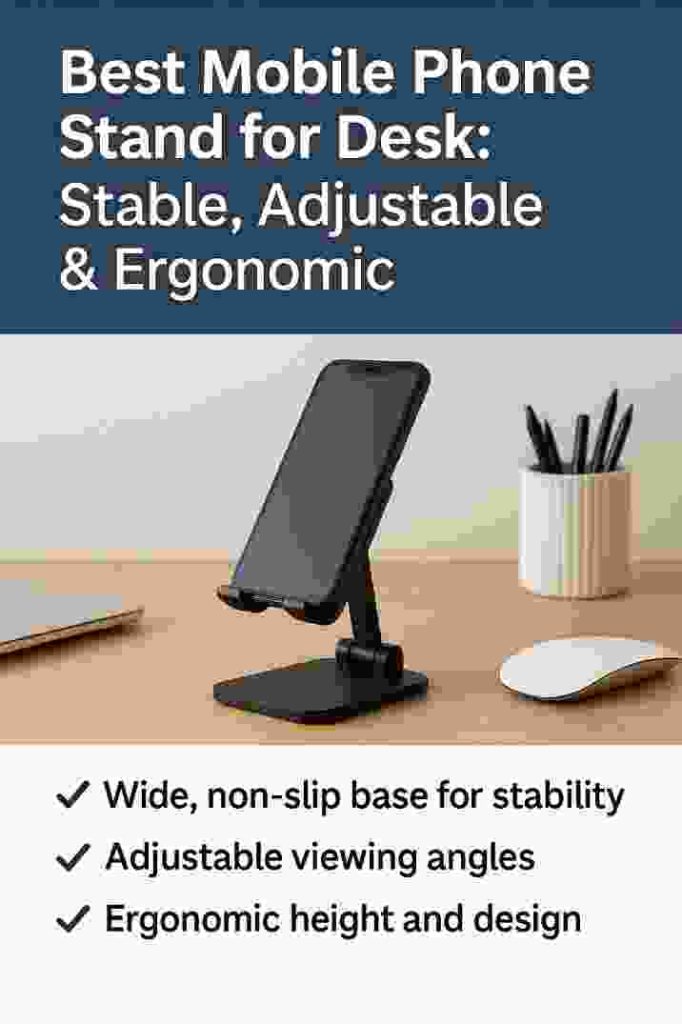
Using a phone stand on your desk is about more than convenience – it’s about health and productivity. When you look down at a phone for texts, video calls or recipes, each tilt forward adds pressure on your neck. Repeated over hours, this leads to chronic strain (“text neck”). For example, Uncaged Ergonomics notes that an adjustable phone stand brings your screen to eye level, reducing neck and shoulder strain and improving posture. Likewise, an April 2025 ergonomic study highlights that people spend at least 3 hours per day hunched over phones, causing stiff, sore necks. The solution is simple: keep the phone upright and at a comfortable viewing angle with a desk stand.
- Hands-free convenience. A phone stand holds your device upright, so you don’t have to cradle it. This is ideal for video calls or watching tutorials while cooking or working. It lets you multitask (type, write, or sip coffee) while your phone stays propped securely.
- Better posture. With the phone elevated, you can keep your head up. Ergonomic experts confirm that a stable stand that raises the phone to eye level can prevent forward-head posture and tech neck.
- Clutter-free desk. A desk phone stand creates a dedicated spot for your phone. Instead of lying flat or wobbling against books, the stand keeps your workspace organized. Some models swivel 360°, so your device is always easy to see without cluttering the desk.
- Stable viewing. Whether you’re on a Zoom call or following a recipe video, a good stand won’t tip over or slide. It provides a steady, hands-free holder that standard tabletops can’t match.
By keeping your phone at a fixed, adjustable position, desk stands also help prevent accidental falls. No more dropping your device when it slips out of your hand or slides off a low pile of papers. In short, a desk phone stand offers a simple ergonomic upgrade – lifting your screen to a comfortable angle, reducing neck strain, and leaving your hands free to work or relax
Key Features of the Best Mobile Phone Stands
When choosing a mobile phone stand for your desk, look for the following essential features. A high-quality stand should combine stability, adjustability, and ergonomic design:
- Wide, non-slip base for stability. The stand must hold your phone securely without wobbling or tipping. Models with a wide or weighted base prevent toppling, even when you tap the screen. Rubber feet or silicone pads on the bottom and cradle add grip and protect surfaces. Experts recommend a “wider base to ensure stability, especially for larger smartphones”.
- Adjustable viewing angles. Top stands allow tilting or rotating so you can set the perfect angle. Look for models with hinged joints or ball pivots that let you change tilt (portrait/landscape) and, ideally, adjust height. This flexibility means you can bring the phone to eye level whether you’re sitting, standing, or on a video call. As one guide notes, adjustable angles let you position the phone comfortably during video calls, recordings, or long viewing sessions.
- Ergonomic height and eye-level design. Beyond tilt, some stands allow raising the phone vertically. Any stand that helps align the screen with your line of sight will reduce neck bending. Even a stand that simply props the phone higher than a flat desk can give ergonomic benefits. Several sources emphasize that using a stand “positions your device at an optimal eye level, which can reduce neck strain”.
- Secure phone cradle. The cradle or lip where your phone rests should be wide and strong to fit larger phones or phones with thick cases. Cushions, rubber trim, or silicone mats in the cradle protect against scratches and hold the phone firmly. Some stands have adjustable width or extendable grips for multiple devices.
- Build quality and materials. Durable materials (like anodized aluminum, sturdy plastic, or solid wood) ensure the stand won’t bend or break under weight. Metal or hard-plastic arms often provide rigidity, while wooden or bamboo stands add aesthetic warmth. Many premium stands use aircraft-grade aluminum to combine light weight with stability.
- Additional features (swivel, charging, cables). Some stands offer 360° rotation so you can easily switch between vertical and horizontal views. Others double as wireless charging docks or include cable clips to keep chargers tidy. In fact, “charging phone stands” – which function as both a stand and wireless charger – are increasingly popular. These let you prop your phone and charge it simultaneously without extra desk clutter. (Look for MagSafe compatibility for seamless charging on newer phones.)
- Portability and foldability. If you need to carry a stand, many are compact and fold flat. Travel-friendly stands fold down or disassemble so you can slip them in a bag. A good portable stand still locks firmly in place when open.
Choosing a stand with these qualities means you get a hands-free, ergonomic dock that holds your phone exactly where you want it. In practice, the best stands combine all of the above: they keep your phone upright and steady (no tipping), let you dial in the perfect angle, and bring the screen up to eye level.
Types of Mobile Phone Stands for Desks
Phone stands come in several designs. Here are the most common types to consider:
- Desktop Stand (Fixed Base): A classic, stable stand with a weighted or broad base that sits on the desk. Examples include simple wooden or metal stands (like the one shown above) that prop the phone upright. These often have a fixed height but allow angle adjustment. They’re best for home or office desks since they stay put.
- Gooseneck or Arm Stand: These have a flexible metal or plastic neck that you can bend into position. The base may clamp onto the desk or stand on the desk. Gooseneck stands let you place the phone precisely (e.g., beside your monitor or even overhead). They are stable but less compact. Ideal for long viewing where you can lock the bend in place.
- Foldable/Portable Stand: Compact stands that fold flat (often made of metal or plastic). Perfect for travel, laptop bags, or occasional use. They usually unfold into a triangle or tripod shape to hold the phone. While lightweight, good ones have rubber grips and sturdy hinges so they don’t collapse under device weight.
- Tripod Stand: A small tripod (sometimes with bendy legs) designed for phones. Great for photography or video, but also usable as a desktop stand. They’re very stable and adjustable, though bulkier.
- Magnetic/Stick-On Stand: A modern option where a small magnetic plate or adhesive grip sticks to the phone. These can attach to compatible magnetic mounts or stands. For example, MagSafe stands for iPhone use magnets to snap the phone to the holder. This provides a very sleek, low-profile setup but requires compatibility.
- Wireless Charging Stand: As mentioned, these combine a stand with an integrated charger. You simply rest your phone on the dock and it charges wirelessly. These stands typically tilt the phone slightly back so the screen is visible while charging. They’re perfect for bedside or office desks where you want your phone charging and accessible.
Each type has its own advantages. Fixed desktop stands are ultra-stable and often the most ergonomic for desk work. Goosenecks and tripods are more versatile in positioning. Foldables prioritize portability. Choose the style that fits where and how you use it. In any case, focus on stability and adjustment – whether it’s a sleek aluminum stand or a coiled-arm holder, the principles of support and ergonomics remain the same.
Top Mobile Phone Stand Picks for Your Desk
While we won’t list every model, here are a few popular stand styles that meet our criteria:
- Adjustable Aluminum Stand (e.g. Omoton/Lamicall style): These metal stands have an angled cradle and a hinge so you can change tilt. They are very stable with solid bases and rubber padding. Brands like Omoton and Lamicall produce highly-rated models that support large phones and even small tablets. They often fold flat too.
- Wooden/Bamboo Stand: For an eco-friendly or stylish touch, wood stands are sturdy and attractive. They usually have a fixed angle (about 60° tilt), which is great for face timing or movie-watching at eye level. The natural material can add warmth to a minimalist desk.
- Gooseneck Clamp Stand: If you want ultimate flexibility, a gooseneck arm with a clamp (attaching to the desk edge) puts the phone exactly where you want. Look for one with a metal spring arm. It stays put when adjusted and is handy if you need to share screen view without moving your head.
- Foldable Travel Stand: A pocket-sized stand, often made of aluminum, that unfolds into a tripod. Not as sturdy as a full-size stand, but great if you work in different places or travel. It’s light and can fit in a laptop bag.
- Wireless Charging Dock: For those with a phone that supports wireless charging (Qi or MagSafe), a charger-stand combo is superb. It props the phone at a slight angle so you can see notifications. Just place your phone on it and it charges automatically – multitasking made even easier.
Ultimately, the best stand for your desk depends on your workflow. If you mostly video chat at your desk, an adjustable aluminum stand with robust angle settings is ideal. If you want a clutter-free aesthetic, a wooden or magnetic stand could fit your style. Whatever you choose, prioritize the features above (stable base, adjustable angles, hands-free view) – these traits, not brand names, make a stand truly effective.
How to Choose the Right Phone Stand
Selecting the perfect phone stand involves matching features to your needs. Use these quick tips:
- Check Stability: Read reviews or product details to ensure the stand is solid. A stable stand will have a low center of gravity and non-slip feet. Avoid any stand that feels “wobbly” in product images or descriptions.
- Look for Adjustability: Make sure you can change the tilt (and height, if needed) to suit sitting vs standing. For example, a stand that tilts between 40° and 120° covers most uses. The ability to rotate or fold is a bonus.
- Consider Your Phone Size & Case: If you have a large phone or use a bulky case, verify that the stand can accommodate it. Some cradles have adjustable grips or are wide enough for plus-size phones.
- Material & Build: Metal stands (aluminum) are strong and premium-feeling. Good wood or plastic stands are also fine if well-built. Avoid very cheap plastic that can break or bend.
- Additional Needs: If you often charge at your desk, a wireless charging stand (MagSafe dock for iPhone, for example) is convenient. If portability matters, ensure your stand is foldable. For heavy use, a metal stand with a weighted base is best.
- Read Ergonomic Guidelines: Remember that the goal is a neutral neck posture. When shopping, visualize the stand holding your phone at eye level. That’s a good ergonomic sign.
By weighing these factors – stability, adjustability, compatibility, and ergonomics – you’ll end up with a stand that keeps your phone (and your neck) happy. If in doubt, read product Q&As to see if a stand won’t slip or if the angle is firm. Invest in a quality model: a well-designed stand “can make a huge difference” in your comfort and desk organization.
FAQs About Desk Phone Stands
Q1: Do phone stands really help posture and reduce neck pain?
A: Yes. By elevating your phone to eye level, a desk stand forces you to look straight ahead rather than hunched over. Ergonomics experts confirm that this change in angle significantly cuts down neck strain. Over time, using a stand can prevent the chronic “text neck” issues caused by looking down for hours.
Q2: Can I use my phone case with a desk stand?
A: Generally, yes. Most stands are designed to hold phones with or without cases. Look for stands with slightly wider cradles and silicone pads; these will grip even a thick protective case firmly. Some cases (like MagSafe or case-integrated kickstands) work on any stand. If you have an especially bulky case (e.g. with card slots), double-check the stand’s max phone thickness.
Q3: What materials make a good phone stand?
A: Durable, rigid materials like metal (aluminum) or solid wood are great for stability. Good stands often use anodized aluminum for strength plus light weight. Rubber or silicone parts on the cradle keep your phone scratch-free. Avoid flimsy plastics – they can bend or crack. A sturdy stand usually feels weighty and has a premium finish.
Q4: Do wireless charging phone stands work well?
A: They can be very convenient. These stands double as a charging pad, usually using Qi or MagSafe tech. They are ideal if you want your phone charging and visible at the same time. Ensure your phone supports wireless charging and that the stand’s power output meets your phone’s needs (15W+ is common). Note: wired charging stands (with a Lightning or USB-C cable) also exist. Choose based on your phone model and preferences.
Q5: How do I stop my phone from slipping on the stand?
A: Most quality stands have rubber or silicone pads on the cradle where the phone rests. These pads grip the phone and keep it from sliding. Also, stands with angled edges or side grips prevent tipping. If your stand feels slick, you can add a small piece of non-slip tape or ensure the cradle padding is clean. The best stands are tested to hold phones securely even if you tap the screen.
Conclusion & Call to Action
A mobile phone stand for desk is a small investment with big payoff: it keeps your phone secure, your hands free, and your body healthier. The right stand is stable enough to avoid tipping, adjustable enough for any viewing angle, and ergonomic enough to protect your neck and shoulders. As Mayo Clinic and ergonomics experts note, elevating your device can prevent the painful “tech neck” caused by hours of looking down.
We hope this guide helps you choose the ideal desk stand. Which stand will you try? Or do you already use one? Let us know in the comments! Share this article with your colleagues or on social media to help others upgrade their workspace. A good desk phone stand can transform your daily routine – take action today and enjoy a more comfortable, organized, and efficient desk setup.
Mobile Phone Stand for Desk
About the Author