Smartphone cameras have come a long way – they now shoot in 4K, feature advanced stabilization, and rival many standalone cameras. Yet even the steadiest hand can’t eliminate shake when filming. A tripod mobile phone holder is the secret weapon for clear, professional-looking video. With the explosion of mobile content creation on platforms like TikTok, Instagram, and YouTube, demand for smartphone tripods is skyrocketing. Industry analysts note that advanced smartphone cameras and social media trends have “fueled the demand for accessories that help users stabilize their phones for better photos and videos”.
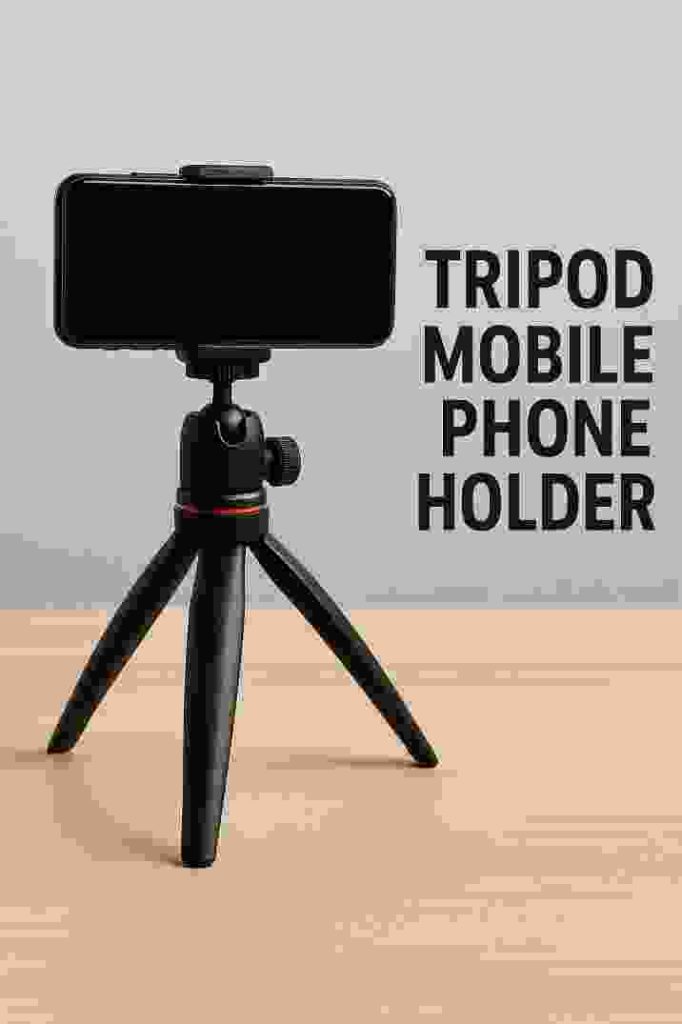
In practice, a tripod helps you capture shots that would be impossible freehand – from stable long exposures in low light to smooth, hands-free video. As TechRadar observes, top phone tripods give even the best cameraphones “new abilities in low light” and let you create creative shots like slow-motion and time-lapses.
Using a tripod also frees your hands for presentations, voice-overs, or multi-device setups. For example, TechRadar points out phone tripods are “essential for vloggers and YouTubers” and make it easy to get into group shots or have hands-free video calls. In short, any serious smartphone videographer or casual user benefits from a tripod’s stability and flexibility. This guide will help you choose the right tripod mobile phone holder – one that’s both stable and adjustable for perfect videos.
Why Use a Tripod Mobile Phone Holder?
A tripod holder transforms your shaky phone videos into smooth, professional footage. Key benefits include:
- Unmatched Stability: A tripod eliminates hand-shake and blur. As one camera guide advises, “stability is everything” – look for solid legs and reliable locking mechanisms to keep your phone rock-steady.
- Versatile Angles: Adjustable legs and heads let you film from any perspective. By extending to waist height or dropping to ground level, you can capture cinematic low-angle shots or wide vistas. Having an adjustable height is crucial – it “really helps to get that perfect shot,” whether you’re aiming low or high.
- Hands-Free Convenience: Tripods free your hands for multitasking. You can record solo without a cameraman, do live streams, or take timed group photos with you in the frame. TechRadar notes they are ideal when you want to “hands free on a video call” and to get “a great group shot that you’re actually in”.
- Creative Effects: Steady support enables techniques like long exposures, time-lapses, and smooth panning. For instance, a tripod lets you slow down shutter speeds for dreamy motion blur or do interval-lapse filming. Top reviewers highlight that tripods let smartphone videos do things impossible handheld.
- Accessory Support: Many tripods include mounts for lights, microphones, or even a second camera. For example, advanced GorillaPod rigs allow attaching lights and mics for studio-style vlogs. This versatility turns your phone into a mini film studio.
In summary, a tripod mobile phone holder is a must-have for anyone serious about mobile video. It ensures your footage is crisp and allows creative, hands-free shooting, from social media clips to full-scale video projects.
Key Features to Look For
Choosing the right tripod comes down to features that ensure stability and adjustability. When shopping, keep these key attributes in mind:
- Solid Construction: Look for strong materials like aluminum or carbon fiber. Quality tripods use sturdy, thick legs and secure locking joints to prevent wobble. As one expert notes, a good tripod has “solid legs and a reliable locking system” to keep everything steady.
- Height Range: Adjustable height is essential. Many tripods extend anywhere from a few inches (for tabletop use) up to 4–5 feet. Being able to fine-tune height and tilt means you get the perfect framing. A fluid or ball head that pan/tilts 360° is also a big plus for smooth camera moves.
- Phone Mount Compatibility: Ensure the clamp or holder fits your phone (with case) and grips firmly. Some tripods include a universal smartphone adapter or a spring-loaded clamp. For example, the Manfrotto PIXI kit has a clamp that expands to fit phones up to 3.2 inches wide. A built-in ¼” screw mount is useful too – many phone tripods double as camera tripods (the PIXI’s mount works with DSLRs).
- Portable & Lightweight: If you’ll be on the move, check the folded size and weight. Compact tripods (like mini or tabletop models) are easy to carry. In fact, TechRadar praises the Joby GripTight Micro Stand as “small and lightweight” – it even “slips into your pocket” while still offering a stable base. Balance portability with sturdiness; ultralight tripods may sway more in the wind.
- Secure Clamps & Feet: Non-slip rubber feet and a tight phone clamp are vital. Adjustable rubber feet can grip uneven ground. As one guide suggests, “adjustable rubber feet can help keep things steady on all kinds of surfaces”. Also ensure any quick-release or clamp has solid tension (the worst thing is your phone sliding or falling).
- Extra Features: Some tripods include handy extras like a Bluetooth remote shutter, bubble level, or built-in lights. For example, ring-light tripods integrate an LED lamp (covered later). Evaluate what accessories you need for your shooting style.
By focusing on sturdy build, height adjustability, and reliable mounts, you’ll pick a tripod phone holder that delivers professional stability and flexibility.
Types of Tripod Mobile Phone Holders
Tripod holders come in several styles, each suited to different shooting needs. Here are the common types to consider:
- Desktop (Tabletop) Tripods: Short, portable stands that sit on a table or desk. These are compact and stable on flat surfaces. They’re perfect for vlogging, streaming, tutorials, or product shots at eye level. Market reports describe desktop tripods as “compact, short tripods designed for stable use on a flat surface”. Example: The Manfrotto PIXI Mini Tripod is a popular tabletop model – reviewers call it “sturdy and steady” despite its small size.
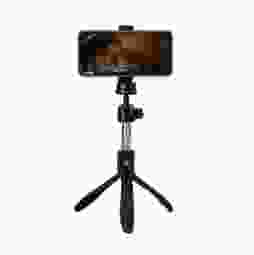
- Selfie / Travel Tripods: Telescoping tripods (often doubling as selfie sticks) that extend a few feet. They are usually lightweight and foldable. Analysts note that selfie tripods are “lightweight, portable tripods designed for personal use”. They let you shoot from arm’s length and carry along for travel or outdoor shoots. The Joby GripTight Pro TelePod is an example; it extends for extra height and can double as a selfie stick.
- Flexible “GorillaPod” Tripods: These have bendable, wrappable legs that can grip uneven surfaces or wrap around objects. As the market description says, flexible tripods have “bendable legs… allowing users to attach their phones to various surfaces, including tree branches or railings”. In practice, they are ideal for adventurous or on-the-go shooting. For example, Joby’s GorillaPod 3K Kit features “wrappable legs” that let you “grip it, wrap it or stand it” on virtually any surface, making it great for hiking, cycling, or any irregular terrain.
- Full-Sized/Extendable Tripods: Traditional camera tripods that can rise several feet high. These offer maximum height and stability. Many include a ball head for smooth panning. For instance, a Manfrotto tripod kit with a full-size stand gives “even greater flexibility” and “better scope for framing your shots… from a variety of different heights and positions”. Such tripods can double as camera supports for DSLRs as well. They’re bulkier but essential for professional video on location.
- Ring Light Tripods: These combines a tripod with an integrated LED ring light, aimed at vloggers, makeup artists, and live streamers. The ring light surrounds the phone or camera to provide even illumination. For example, Neewer’s 18-inch ring light kit comes with a tripod stand and phone holder and extends up to 61 inches. It’s described as a “deluxe option” with a dimmable 18″ light for studio-quality recording. These stands are perfect for indoor video, TikTok/skincare tutorials, or anywhere you need bright, soft lighting along with stability.
Choosing the type depends on your use case: a desktop tripod is great for desk work, a travel tripod suits on-the-go shoots, flexible legs work for unconventional mounting, and ring-light stands give lighting + stability in one package. Consider where and how you’ll film to pick the right style.
Best Tripod Mobile Phone Holder Recommendations
Based on expert reviews and user feedback, here are some top tripod mobile phone holders known for their stability, adjustability, and video-friendliness:
- Manfrotto PIXI Mini Tripod Kit – A compact tabletop tripod with a smartphone clamp. Reviewers praise it as a “clear choice” for smartphone use, noting it is “exceptionally portable, easy to use,” and it holds your phone securely. TechRadar calls the PIXI “sturdy and steady” despite its small size. It even has a standard ¼″ mount (so you can use it with DSLRs or GoPros). Ideal for: Vloggers or streamers who film at a desk or tabletop.
- Joby GorillaPod 3K Kit – A versatile tripod with flexible, grippy legs. It is “ideal for wrapping around objects and uneven surfaces”. Its legs bend and grip so you can mount it on a railing, tree branch, or any flat surface. With a ball head, you get full 360° orientation. As the product notes confirm, its “wrappable legs allow you to secure… equipment to virtually any surface”. Ideal for: Adventure videography, travel, or any scenario where you can’t set the tripod on flat ground.
- Joby GripTight Pro TelePod – A telescoping tripod that doubles as a selfie stick. This all-in-one design extends to about 31 inches for extra height, and folds down compactly. TechGearLab calls it “one of our all-time favorite tripods” for its height and features. It folds small for travel and even has adapters for GoPro. (Note: at max extension it can be a bit wobbly, so it’s best used on a stable surface or for moderate height.) Ideal for: Vloggers who need a taller shot without a full stand, or anyone wanting a carry-anywhere tripod/monopod hybrid.
- Neewer Ring Light 18″ Kit – A 2-in-1 ring light and tripod stand. It includes an 18-inch LED ring (55W, 5500K) with brightness controls and a mount for your phone in the center. The stand extends to about 61 inches. Reviewers call this a “deluxe option” for smartphone video, noting it provides professional lighting and “feels decently durable”. Ideal for: Indoor creators doing makeup tutorials, product showcases, or any videos requiring well-lit, shadow-free lighting.
- Manfrotto Compact Light Tripod Kit – A lightweight travel tripod (often sold with a phone clamp). This full-sized tripod offers a wide height range and includes a ball head for smooth framing. TechRadar notes that its lightweight design makes it “ideal for travel and transportation” while still providing variety of heights. Ideal for: Shooting outdoors or on-location when you need maximum height and stability without extra bulk.
Each of these stands offers a blend of stability and adjustability. The Manfrotto and GorillaPod kits are crowd favorites, while telepods and ring-light stands serve specific niches. Explore features like height range, weight capacity, and portability to pick the one that fits your filming style.
FAQ
Q: What features make a tripod mobile phone holder stable and adjustable?
A: A stable tripod has solid build materials (like aluminum or carbon-fiber legs), a wide base, and tight leg locks or clamps. Look for reliable locking joints and rubber feet for grip; these prevent wobbling. For adjustability, choose a tripod with extendable legs and a pan/tilt or ball head. This lets you raise the tripod from a few inches to several feet. Height-adjustable heads (360° swiveling) allow low-angle or overhead shots on demand.
Q: Why should I use a tripod for my smartphone videos?
A: Using a tripod drastically improves video quality. It keeps your phone steady, so footage is clear and free of hand-shake blur. It also lets you shoot hands-free – essential for vlogging, long exposures, or multi-tasking. As experts note, tripods give smartphones “new abilities in low light” and enable creative compositions (like time-lapses). They make framing consistent, help maintain focus on subjects, and let you be in the shot (group selfies) without covering the camera.
Q: What height should a smartphone tripod be for video recording?
A: It depends on your framing needs, but a good rule of thumb is waist height for shooting people or interviews. Industry sources suggest setting the tripod around your waist produces natural-looking angles. If you’re shooting vlogs or product demos, adjust the height so the camera is level with your subject’s face or center of interest. Also make sure all tripod legs are fully extended and locked to maximize stability. Many tripods have rubber feet which you can adjust for uneven ground.
Q: Can I use a regular camera tripod for my phone?
A: Yes. Most camera tripods use the standard ¼″ mounting screw. You simply need a smartphone clamp (often included) to attach your phone. For example, the Manfrotto PIXI tripod has a ¼″ mount and comes with a smartphone holder adapter. This means you can also swap to a DSLR or GoPro on the same stand. Just ensure your phone clamp fits your device and locks it securely.
Q: Are flexible GorillaPod tripods good for shooting video?
A: Absolutely. Flexible tripods (like Joby’s GorillaPod series) are great for versatility. Their bendable legs grip onto branches, poles, or uneven surfaces, allowing stable shots in tricky places. Reviews highlight that GorillaPods have “wrappable legs” for attaching to almost any surface. They’re a favorite for travel and outdoor filming where a flat setup isn’t available. Just be mindful of weight limits – keep gear light or center the mass well.
Q: How do I keep my tripod mobile phone holder from falling over?
A: Stability tricks include spreading the legs wide and placing one leg against any slight slope if possible. Adding weight (like hanging a bag on the center column if provided) also helps in windy conditions. Set the tripod on flat ground and lock all leg sections. Many tripods have a center brace or hook for extra weight. Also, double-check that your phone clamp is tight so the phone’s weight isn’t shifting its balance.
Q: Can I shoot vertical video with these tripods?
A: Yes. Most smartphone tripods allow portrait orientation. Either your phone clamp tilts 90° or you can detach the clamp and mount it rotated. For example, many tripods have a ball head that you can swivel so your phone is vertical. This is perfect for social media videos like Instagram Reels or TikToks. Always ensure the clamp grips well in vertical mode to prevent slips.
Whether you’re streaming live, filming family moments, or creating content, the right tripod mobile phone holder makes all the difference. We hope this guide has helped you understand what to look for and which models shine. Found a favorite tripod model or have more tips? Share your experiences below and join the conversation. If you liked this guide, share it with friends or on social media to help others capture smoother, more engaging smartphone videos!
Sources: Research from industry reports and expert reviews.
About the Author